How data classification drives backup optimisation and storage cost reduction
Most organisations back up everything the same way. Classification is the discipline that turns indiscriminate backup into intelligent backup — and cuts storage costs by 25–40%.
Definition
Data classification — the discipline of categorising data by business criticality, sensitivity, regulatory requirements, and access frequency. The act that turns indiscriminate backup into an intelligent, defensible strategy.
Most organisations back up everything with the same frequency, the same retention period, and the same storage tier. It feels safe. It is also expensive, inefficient, and operationally risky. The "back it all up the same way" approach treats a customer database and a build artefact cache as if they were equally valuable, which means either over-protecting trivial data at huge cost or under-protecting critical data at huge risk. Usually both at once.
Data classification is the practice that makes backup intelligent rather than indiscriminate. It is the discipline of looking at every category of data your business holds and deciding — deliberately, with cross-functional input — how critical it is, how sensitive it is, how often it is accessed, and what regulatory regime applies to it. Once you have those answers, the right backup strategy for each category almost designs itself. Without them, every backup decision is a guess dressed up in a policy document.
What data classification is and why backup teams need it
Data classification is the process of categorising data by four dimensions: business criticality, sensitivity, regulatory requirements, and access frequency. Business criticality answers "how badly does the business hurt if this data is unavailable, lost, or corrupted?" Sensitivity answers "what damage could be done if this data leaked?" Regulatory requirements answer "what laws or contractual obligations dictate how this data must be retained, protected, and disposed of?" Access frequency answers "how often does the business actually need to read or modify this data?"
Without classification, every backup decision is a guess. Should this database be backed up hourly or daily? Should these archives be on hot storage or cold storage? How long should we retain weekly snapshots? Why are we still keeping seven-year-old test data on the same SSD tier as live financial records? In the absence of classification, these questions get answered by the path of least resistance — usually "back it all up the same way" — and the result is a backup estate that is simultaneously over-engineered for unimportant data and under-engineered for the data that actually matters.
The four classification tiers
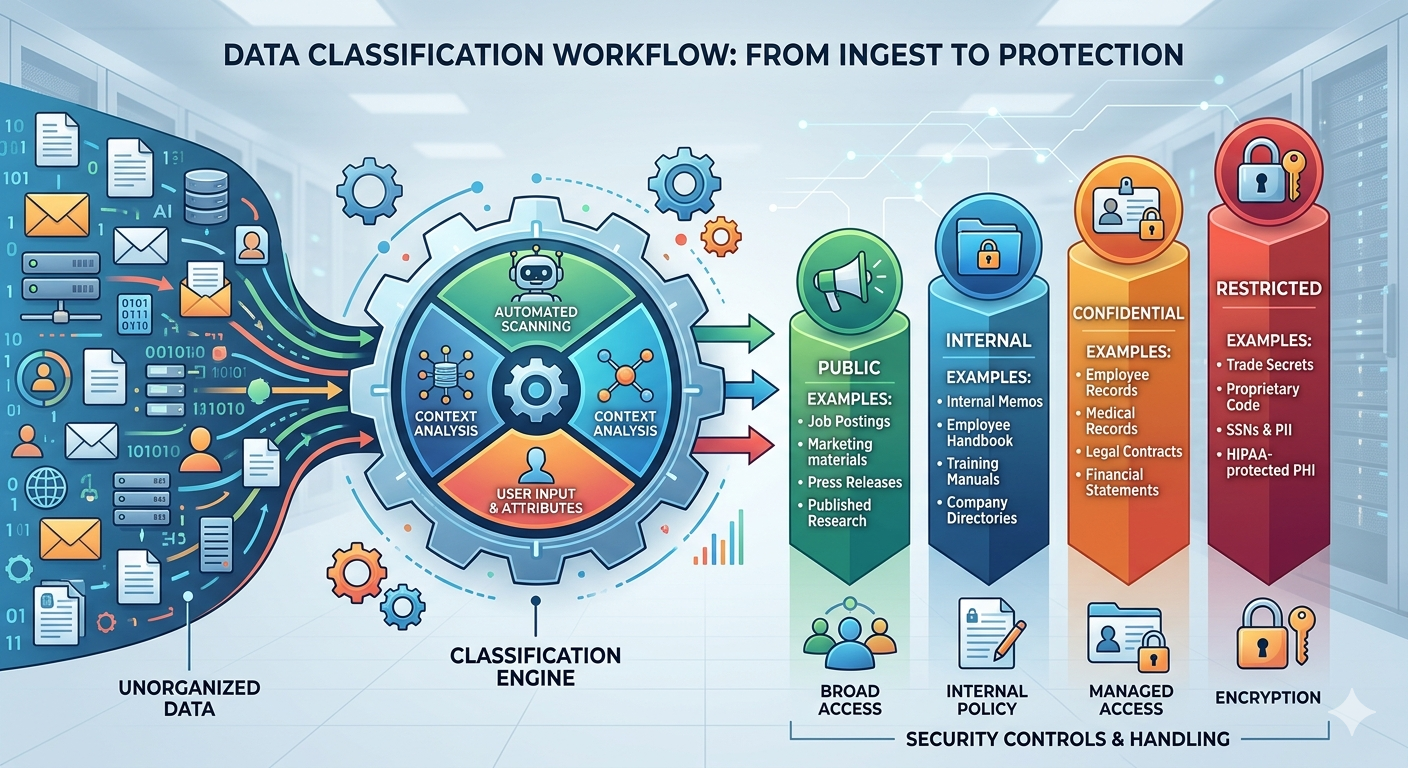
A practical classification scheme uses four tiers. The exact definitions can be tuned to your industry and regulatory environment, but the structure is consistent across most mature data management programmes.
Tier 0 — Mission critical
Production databases, financial systems, payroll, ERP, customer master data, identity stores. Continuous protection, multiple captures per day, immutable copies, recovery measured in minutes. Highest cost per GB — justified, because the alternative is existential.
Tier 1 — Business important
Operational data, project files, current correspondence, departmental databases. Daily backups, 30–90 day retention, standard storage class. Recovery in hours. Loss is painful but recoverable.
Tier 2 — Reference data
Compliance archives, completed projects, regulatory submissions, statutory retention. Weekly or monthly captures, multi-year retention, cold or archive storage. Nobody needs a 2018 audit archive restored in fifteen minutes.
Tier 3 — Transient data
Temp files, logs, build artefacts, caches, intermediate processing files. Minimal or no backup — regenerable from upstream sources. Backing up Tier 3 with Tier 0 rigour is the most common and most expensive mistake in data protection.
How classification drives backup decisions
Classification turns four dimensions of analysis into four dimensions of backup design: frequency, retention, storage class, and recovery SLA. The logic chain is direct.
Frequency is driven by the rate of change and the recovery point objective. Tier 0 data changes constantly and the business cannot tolerate losing more than minutes of work, so backup frequency must be measured in minutes — typically through continuous replication or very frequent snapshots. Tier 1 changes daily and the business can tolerate a day of loss, so daily backups suffice. Tier 2 rarely changes once written, so weekly or monthly captures are appropriate. Tier 3 changes constantly but recovery is unnecessary, so frequency drops to zero or near-zero.
Retention is driven by regulatory requirements and historical recovery patterns. Tier 0 retention is governed by both — the regulatory minimum plus the operational requirement to recover from incidents discovered weeks or months later. Tier 2 retention is almost entirely regulatory: the compliance regime says you must keep this for seven years, so you keep it for seven years. Tier 3 retention is essentially zero.
Storage class is driven by access frequency and recovery SLA. Tier 0 must live on fast, verified, frequently-accessed storage because recovery must be quick. Tier 2 can live on cold or archive storage — far cheaper per terabyte — because nobody needs immediate access; a four-hour retrieval time is acceptable for an archive nobody has touched in five years. Putting Tier 2 data on Tier 0 storage is one of the largest sources of unnecessary spend in IT budgets.
The cost impact of poor classification
Gartner and other industry analysts consistently report that organisations without a documented data classification policy spend 25–40% more on storage than necessary. The mechanism is simple: in the absence of tiering, the default behaviour is to put everything on the highest-cost storage that anyone might need, and to back everything up with the most aggressive policy any system requires.
Consider an organisation with 500 TB of total backup storage. If 40% of that — 200 TB — is Tier 3 data (logs, temp files, build artefacts, regenerable caches) sitting on Tier 0 backup infrastructure, the cost differential between Tier 0 and Tier 3 storage classes is typically 4–6x. That means the organisation is paying somewhere between 600 and 1,000 percent of what it needs to pay to protect that 200 TB. On a backup budget that started at, say, USD 250,000 per year, that is USD 50,000 to USD 100,000 of pure waste — every year, compounding as the data estate grows.
The waste compounds in a second dimension too: backup windows, network bandwidth, and operational overhead. Backing up 500 TB nightly takes longer, uses more bandwidth, generates more administrative load, and creates more failure modes than backing up the 100 TB that actually needs to be backed up nightly. Classification does not just save storage cost; it shrinks the entire operational surface area of the backup programme.
"Classification is a one-time investment that pays back on every backup cycle, every month, for as long as your data estate exists."
Five steps to implement basic data classification
-
1Assemble a cross-functional teamIT, legal, finance and operations all have a stake. Classification is a business decision with technical implementation, not a technical decision IT can make alone. Sign-off must come from business owners.
-
2Inventory your data sourcesEvery system, database, file store, and SaaS application that holds business data. The act of producing the inventory itself usually surfaces shadow systems and forgotten data stores nobody has been protecting.
-
3Apply three classification questionsHow critical is it to operations? How sensitive is it (PII, financial, regulated)? How frequently is it accessed? The answers map naturally onto the four-tier model.
-
4Document the policy and get sign-offClassification without authority is just a spreadsheet. The policy must be approved by the executive responsible for risk and built into procurement and project intake processes.
-
5Link classification to backup policiesThe whole point is to change how you protect data, not just to label it. Each tier must be tied to specific backup frequency, retention, storage class, and recovery SLA — and the backup system configured accordingly.
A basic classification matrix
A basic classification matrix maps real-world data examples onto tiers. In practice the matrix is a table with columns for data type, examples, classification tier, and resulting backup policy. Customer PII, payment records, identity stores, and core financial databases sit in Tier 0 with continuous protection and aggressive recovery SLAs. Active project files, departmental working data, and current correspondence sit in Tier 1 with daily backup and standard retention. Completed project archives, regulatory submissions, statutory retention records, and aged reference data sit in Tier 2 on archive storage. Build artefacts, transient logs, intermediate processing files, and regenerable caches sit in Tier 3 with minimal or no backup.
The exercise of mapping your specific data estate onto this matrix is itself the core of the classification project. It surfaces decisions that have never been made explicitly, exposes data nobody is protecting, and identifies expensive over-protection that has been quietly draining the budget for years. The matrix is the deliverable; the conversation that produces it is the value.
Closing
Classification is a one-time investment that pays back on every backup cycle, every month, for as long as your data estate exists. It reduces cost, sharpens recovery capability, simplifies operations, and — perhaps most importantly — makes your backup decisions defensible. When the auditor asks why a particular system has the retention policy it has, "because that is what the classification matrix prescribes for Tier 1 financial data" is a far better answer than "because that is what we have always done."
Start with your ten most critical data sets. Classify them properly, link them to appropriate backup policies, and migrate them to the right storage tiers. Get those right. Then expand the programme outward — Tier 1 next, Tier 2 after that, Tier 3 last. Within a year, most organisations that follow this path discover they have cut their backup storage costs by a quarter or more while simultaneously improving their recovery capability for the data that actually matters. That is the rare combination of cheaper and better, and it starts with a single, deliberate act of classification.